



前回の第48回
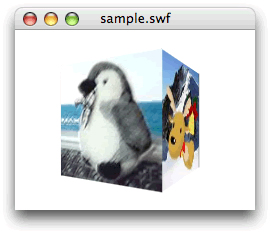
立方体の4面にテクスチャマッピングする
前回の
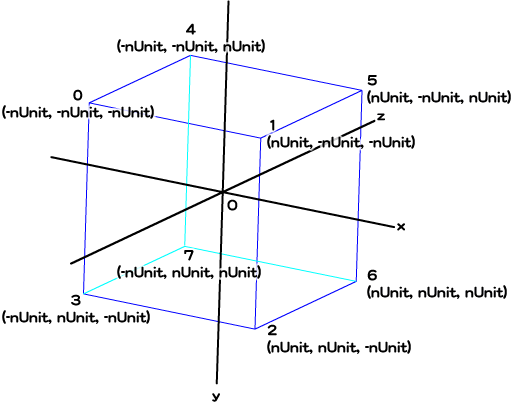
つぎに、
![図2 4面を1枚のビットマップとして[ライブラリ]に納める](/assets/images/dev/serial/01/as3/0049/002.jpg "図2 4面を1枚のビットマップとして[ライブラリ]に納める")
Graphics.
| 頂点番号 | 頂点座標 | uv座標 |
|---|---|---|
| 0 | (-nUnit, -nUnit, -nUnit) | (0, 0) |
| 1 | (nUnit, -nUnit, -nUnit) | (1/ |
| 2 | (nUnit, nUnit, -nUnit) | (1/ |
| 3 | (-nUnit, nUnit, -nUnit) | (0, 1) |
| 4 | (-nUnit, -nUnit, nUnit) | (3/ |
| 5 | (nUnit, nUnit, nUnit) | (2/ |
| 6 | (nUnit, nUnit, nUnit) | (2/ |
| 7 | (-nUnit, nUnit, nUnit) | (3/ |
| 8(0と同じ) | (-nUnit, -nUnit, -nUnit) | (1, 0) |
| 9(3と同じ) | (-nUnit, nUnit, -nUnit) | (1, 1) |
それでは前回のスクリプト2を書替えよう。基本的には、
// フレームアクション
var nUnit:Number = 100 / 2;
var mySprite:Sprite = new Sprite();
var myTexture:BitmapData = new Image();
var vertices:Vector.<Number> = new Vector.<Number>();
var indices:Vector.<int> = new Vector.<int>();
var uvtData:Vector.<Number> = new Vector.<Number>();
var nDeceleration:Number = 0.3;
var myGraphics:Graphics = mySprite.graphics;
var myPerspective:PerspectiveProjection = transform.perspectiveProjection;
var worldMatrix3D:Matrix3D = new Matrix3D();
var viewMatrix3D:Matrix3D = myPerspective.toMatrix3D();
viewMatrix3D.prependTranslation(0, 0, myPerspective.focalLength);
mySprite.x = stage.stageWidth / 2;
mySprite.y = stage.stageHeight / 2;
// Graphics.drawTriangles()メソッドに渡す3引数のVectorオブジェクトを設定
vertices.push(-nUnit, -nUnit, -nUnit);   // 頂点0
vertices.push(nUnit, -nUnit, -nUnit);   // 頂点1
vertices.push(nUnit, nUnit, -nUnit);   // 頂点2
vertices.push(-nUnit, nUnit, -nUnit);   // 頂点3
vertices.push(-nUnit, -nUnit, nUnit);   // 頂点4
vertices.push(nUnit, -nUnit, nUnit);   // 頂点5
vertices.push(nUnit, nUnit, nUnit);   // 頂点6
vertices.push(-nUnit, nUnit, nUnit);   // 頂点7
vertices.push(-nUnit, -nUnit, -nUnit);   // 頂点8
vertices.push(-nUnit, nUnit, -nUnit);   // 頂点9
addRectangleIndices(0, 1, 2, 3);
addRectangleIndices(1, 5, 6, 2);
addRectangleIndices(5, 4, 7, 6);
addRectangleIndices(4, 8, 9, 7);
uvtData.push(0, 0, 0);   // 頂点0
uvtData.push(1/4, 0, 0);   // 頂点1
uvtData.push(1/4, 1, 0);   // 頂点2
uvtData.push(0, 1, 0);   // 頂点3
uvtData.push(3/4, 0, 0);   // 頂点4
uvtData.push(2/4, 0, 0);   // 頂点5
uvtData.push(2/4, 1, 0);   // 頂点6
uvtData.push(3/4, 1, 0);   // 頂点7
uvtData.push(1, 0, 0);   // 頂点8
uvtData.push(1, 1, 0);   // 頂点9
addChild(mySprite);
addEventListener(Event.ENTER_FRAME, xRotate);
function xRotate(eventObject:Event):void {
  var nRotationY:Number = mySprite.mouseX * nDeceleration;
  var vertices2D:Vector.<Number> = new Vector.<Number>();
  xTransform(vertices2D, nRotationY);
  xDraw(vertices2D);
}
function xTransform(vertices2D:Vector.<Number>, myRotation:Number):void {
  worldMatrix3D.prependRotation(myRotation, Vector3D.Y_AXIS);
  var myMatrix3D:Matrix3D = worldMatrix3D.clone();
  myMatrix3D.append(viewMatrix3D);
  Utils3D.projectVectors(myMatrix3D, vertices, vertices2D, uvtData);
}
function xDraw(vertices2D:Vector.<Number>):void {
  myGraphics.clear();
  myGraphics.beginBitmapFill(myTexture);
  myGraphics.drawTriangles(vertices2D, indices, uvtData);
  myGraphics.endFill();
}
// 四角形の4頂点番号をふたつの三角形の頂点番号の組に分けてVectorオブジェクトに納める
function addRectangleIndices(n0:uint, n1:uint, n2:uint, n3:uint):void {
  indices.push(n0, n1, n3);
  indices.push(n1, n2, n3);
}
Graphics.
さて、
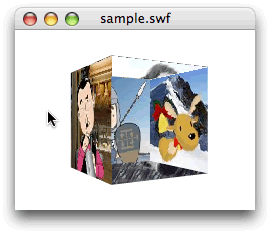
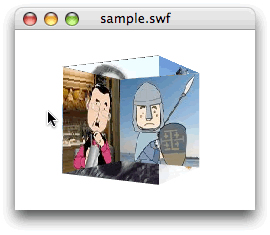
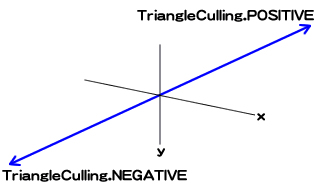
面の裏表の一方だけを描く―カリング
3次元空間における面の重ね順については、
では、
前掲スクリプト1は、
カリングを決めるには、
| 描画する面 | TriangleCullingクラスの定数 | 時計回りの頂点番号で描画される面 |
|---|---|---|
| 正負両面 | NONE(デフォルト) | 両面 |
| 負の方向の面 | NEGATIVE | 手前向きの面 |
| 正の方向の面 | POSITIVE | 奥向きの面 |
スクリプト1にGraphics.

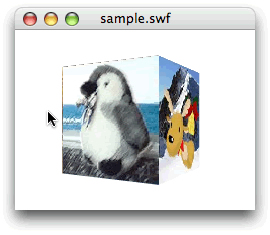
// フレームアクション
var nUnit:Number = 100 / 2;
var mySprite:Sprite = new Sprite();
var myTexture:BitmapData = new Image();
var vertices:Vector.<Number> = new Vector.<Number>();
var indices:Vector.<int> = new Vector.<int>();
var uvtData:Vector.<Number> = new Vector.<Number>();
var nDeceleration:Number = 0.3;
var myGraphics:Graphics = mySprite.graphics;
var myPerspective:PerspectiveProjection = transform.perspectiveProjection;
var worldMatrix3D:Matrix3D = new Matrix3D();
var viewMatrix3D:Matrix3D = myPerspective.toMatrix3D();
viewMatrix3D.prependTranslation(0, 0, myPerspective.focalLength);
mySprite.x = stage.stageWidth / 2;
mySprite.y = stage.stageHeight / 2;
vertices.push(-nUnit, -nUnit, -nUnit);
vertices.push(nUnit, -nUnit, -nUnit);
vertices.push(nUnit, nUnit, -nUnit);
vertices.push(-nUnit, nUnit, -nUnit);
vertices.push(-nUnit, -nUnit, nUnit);
vertices.push(nUnit, -nUnit, nUnit);
vertices.push(nUnit, nUnit, nUnit);
vertices.push(-nUnit, nUnit, nUnit);
vertices.push(-nUnit, -nUnit, -nUnit);
vertices.push(-nUnit, nUnit, -nUnit);
addRectangleIndices(0, 1, 2, 3);
addRectangleIndices(1, 5, 6, 2);
addRectangleIndices(5, 4, 7, 6);
addRectangleIndices(4, 8, 9, 7);
uvtData.push(0, 0, 0);
uvtData.push(1/4, 0, 0);
uvtData.push(1/4, 1, 0);
uvtData.push(0, 1, 0);
uvtData.push(3/4, 0, 0);
uvtData.push(2/4, 0, 0);
uvtData.push(2/4, 1, 0);
uvtData.push(3/4, 1, 0);
uvtData.push(1, 0, 0);
uvtData.push(1, 1, 0);
addChild(mySprite);
addEventListener(Event.ENTER_FRAME, xRotate);
function xRotate(eventObject:Event):void {
  var nRotationY:Number = mySprite.mouseX * nDeceleration;
  var vertices2D:Vector.<Number> = new Vector.<Number>();
  xTransform(vertices2D, nRotationY);
  xDraw(vertices2D);
}
function xTransform(vertices2D:Vector.<Number>, myRotation:Number):void {
  worldMatrix3D.prependRotation(myRotation, Vector3D.Y_AXIS);
  var myMatrix3D:Matrix3D = worldMatrix3D.clone();
  myMatrix3D.append(viewMatrix3D);
  Utils3D.projectVectors(myMatrix3D, vertices, vertices2D, uvtData);
}
function xDraw(vertices2D:Vector.<Number>):void {
  myGraphics.clear();
  myGraphics.beginBitmapFill(myTexture);
  // myGraphics.drawTriangles(vertices2D, indices, uvtData);
  myGraphics.drawTriangles(vertices2D, indices, uvtData, TriangleCulling.NEGATIVE);
  myGraphics.endFill();
}
function addRectangleIndices(n0:uint, n1:uint, n2:uint, n3:uint):void {
  indices.push(n0, n1, n3);
  indices.push(n1, n2, n3);
}
次回はこのスクリプト2に垂直の回転を加える。そうなると、
今回解説した次のサンプルファイルがダウンロードできます。
- スクリプト2のサンプルファイル
(CS5形式/約115KB)